
Learn to manage stress, sleep better, and live healthier with Sense 2–our advanced health and fitness smartwatch.
Turn on and charge your device. To set up Sense 2, first connect it to the charging cable. Get a full day of battery life in just 12 minutes with fast charging.
For more information, go to Charge your Fitbit device.
Set up the Google Health app. To be able to connect your device, you need to create or log in to your Google account and then pair your tracker. To do this:
- Download and install the Google Health app.
- Google Play Store for Android phones
- Apple App Store for iPhones
- Open the Google Health
app and tap Sign in with Google.
- Choose a Google account. If you don't have a Google account, tap Sign In
Create account.
- Follow the on-screen instructions to create an account and pair your Fitbit device with your phone. This allows your devices to communicate and sync data.
 app and tap Sign in with Google.
 Create account.
For more information, check How do I set up my Fitbit device?
 |
Browse your tiles. Swipe left or right from the clock face to see your daily stats, check your heart rate, review how you slept, see your body responses, start a timer, track a workout, and check the weather forecast. For more information, go to How do I navigate my Fitbit device? |
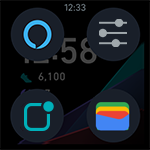 |
Find all your favorite features. Press the button on your watch to browse all your apps. Double-press the button to find shortcuts to your voice assistant3, quick settings, wallet4, and notifications. Hold the button to quickly access your favorite feature, customizable in the Settings app. For more information, go to How do I navigate my Fitbit device? |
 |
Never miss a notification. Swipe up from the clock face to see your phone, text, calendar, and app notifications on your watch. For more information, go to Change phone notifications on my Fitbit device. |
 |
Ask your voice assistant. Check the weather, set timers and alarms, control your smart home devices, and more by speaking to your watch. To use your voice assistant, the Google Health app must be running in the background on your phone.3 For more information, go to How do I use a voice assistant on my Fitbit smartwatch? |
 |
Manage your apps. Add, delete, and customize apps on your watch through the Google Health app. For more information, go to How do I install and manage apps on my Fitbit device? |
 |
Change your clock face. Match your watch to your style by picking from a variety of clock faces. Save your favorite clock faces and easily swap between them in the Google Health app. For more information, go to How do I change the clock face on my Fitbit device? |
 |
Keep the display on. Check the time with just a glance—even when your hands are full. For more information, go to How do I see the time on my Fitbit device? |
 |
Manage your stress. The continuous EDA sensor detects electrodermal activity, which may indicate your body’s response to stress so you can better track and manage it. Body response notifications allow you to reflect on how you’re feeling. Use the EDA Scan app to see how your body responds during a mindfulness session. Check how prepared your body is to handle stress with your daily stress management score. For more information, go to How do I track and manage stress with my Fitbit device? |
 |
Take a breather. Practice guided breathing with the Relax app. Log how you feel afterward to track your stress over time. For more information, go to How do I track and manage stress with my Fitbit device? |
 |
Assess for atrial fibrillation. With the ECG app, assess your heart for atrial fibrillation (AFib)—a heart rhythm irregularity—and share the results with your doctor.5 For more information, go to What is the Google ECG app? |
 |
Track skin temperature changes. Sense 2 logs your skin temperature each night to show how it varies from your personal baseline. Insight into your night-time skin temperature variation can help you understand changes in your body and spot trends. For more information, go to How can Fitbit help me track my temperature? |
 |
Get heart-rate notifications. Your heart rate is a key indicator of health, so stay informed when Sense 2 detects that your heart rate is unusually high or low. For more information, go to Track your heart rate with your Fitbit device. |
 |
Estimate your blood oxygen saturation. Estimate your blood oxygen saturation. Sense 2 uses sensors to estimate your blood oxygen saturation while you sleep.6 For more information, go to How do I track blood oxygen saturation (SpO2) with my Fitbit device? |
 |
Catch some Zzz’s. Based on your heart rate, time asleep and restlessness, your nightly sleep score helps you better understand how you slept. With Google Health Premium, receive a breakdown of your sleep with 10 monthly metrics, along with a sleep animal that reflects long-term trends in your sleep behaviors.7 For more information, go to What's sleep score in the Google Health app? |
 |
Get in the zone. Personalized heart-rate zones help you target the training intensity of your choice. Earn Active Zone Minutes for time spent in the fat burn, cardio, or peak heart-rate zones. For more information, go to Learn about Active Zone Minutes or active minutes on your Fitbit device. |
 |
Get up and step. Sense 2 helps you reach an hourly goal of 250 steps by nudging you at 10 minutes before the hour is over. For more information, go to What are the reminders on my Fitbit device. |
 |
Track your workouts. Use the Exercise app to see real-time stats, capture GPS data, and get a workout summary when you’re done. Sense 2 has built-in GPS so you can leave your phone behind. For more information, go to How to track workouts with my Fitbit device and Google Pixel Watch. |
 |
Let SmartTrack have your back. Your watch automatically detects and records activities at least 15 minutes long. Turn on auto-detect to allow Sense 2 to automatically start the Exercise app when it detects you’re on a walk, run, or bike ride. Open the Google Health app to see your stats. For more information, go to What activities do my Fitbit device and Google Pixel Watch track. |
 |
Pay from your wrist. Sense 2 includes contactless payments, which lets you make purchases and fast-track your way through certain transit systems right from your wrist. For more information, go to What should I know about using my Fitbit device to make contactless payments? |
 |
Respond to messages. On watches paired to an Android phone, respond directly to text messages and app notifications with preset quick replies or by speaking your reply. For more information, go to How do I respond to messages with my Fitbit device? |
 |
Find your phone. When you can’t find your phone, use the Find my Phone app on your watch to locate it. For more information, go to How do I set up and troubleshoot apps on my Fitbit device? |
 |
Check the forecast. See the weather in your current location and in 2 additional locations you choose in the Weather app on your watch or in your tiles. For more information, go to How do I set up and troubleshoot apps on my Fitbit device? |
 |
Find your way. No matter where the day takes you, get turn-by-turn directions on your wrist with Google Maps. For more information, go to How do I use Google Maps on my Fitbit device? |
To learn more about your watch, go to the Fitbit Sense 2 User Manual.
If your watch won't pair or you experience issues transferring data to your phone, go to Why won't my Fitbit device sync?
1Requires use of Google Health app with compatible iPhone or Android devices. A Google account will be required. For more information, go to How to move your Fitbit Account to a Google Account.
2 New and returning Premium members only. Must activate membership within 60 days of device activation (requires valid payment). This membership cannot be gifted. Cancel before end of membership to avoid recurring fees. Content and features may change. Go to Sign up or manage your Google Health Premium subscription for more details. Terms and conditions apply.
3 Voice assistant availability and features may vary, go here. Amazon, Alexa and all related marks are trademarks of Amazon.com, Inc. or its affiliates. Alexa is not available in all languages and countries. Alexa features and functionality may vary by location.
4 See bank and transit availability here.
5 The Google ECG app is only available in select countries; not intended for use by people under 22 years old. Go to Irregular Hearth Rhythm for additional details.
6 Not intended for medical purposes. This feature is not intended to diagnose or treat any medical condition. It is intended to help you manage your well being and keep track of your information. If you have any concerns about your health, please talk to a healthcare provider. If you believe you are experiencing a medical emergency, call emergency services.
7 Premium requires a paid membership. Content and features may change.